
Getting around
Translate signs offline with your camera
Read train signs, ticket machine instructions, and opening hours on your phone when you have no signal.
Yes. With Camera’s languages downloaded, Yakpack can read text in a sign or a locally stored photo and translate it without a connection. Freeze the sign so you can compare the result with the original.
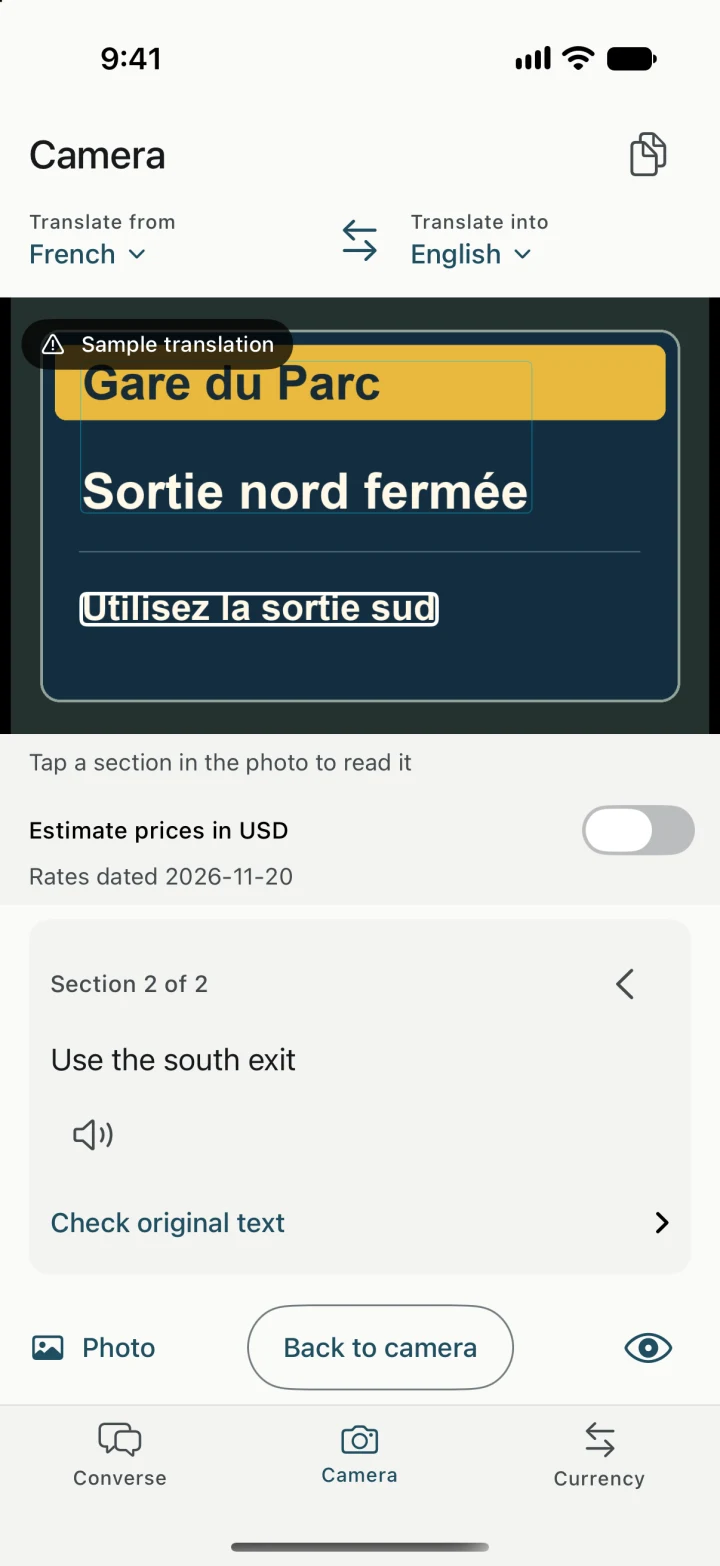
Read the notice before following it
On a station sign, “Sortie nord fermée” means “North exit closed.” The next line, “Utilisez la sortie sud,” tells you to use the south exit. A short notice can have a heading and an instruction. Read both so you know which way to go.
- In Camera, select the sign’s language and the language you want to read.
- Point at the sign and freeze the image. In a crowded station, take a photo first and open it when you have room to stop.
- Move between sections, then compare names, times, and platform numbers with the original. Retake the photo from closer if the sign is hard to see.
When the station information changes
Yakpack reads the words in the image you captured. For a last-minute platform change or a departure time, check the current departure board or ask station staff. If a notice leaves you with a question, open Conversation and ask “Which platform does this train leave from?”
Camera and Conversation have separate language choices. Set up both before your trip if you want to move from reading a sign to asking for help offline. Get the voice translator ready.